10/11/2026
Windows Dictation Stuck on Initializing: The Slides
Voice typing hangs and never starts
This is the short version of Windows Dictation stuck on Initializing: the fix: seven slides, from the ten-second fix to the settings behind the other cause, ending on a table that matches what you see to what to check first. Use the arrow keys or the Next button. With scripts off, the slides read in order below.
The full article has the reasoning, the questions it keeps raising and a link to Microsoft's community thread.
Dictation stuck on Initializing, slide by slide

Voice typing runs on Microsoft's serversInitializing is what it shows while it tries to reach Microsoft. Without a connection it never gets past that word. 
End one task, then press Win+HAbout ten seconds, no reboot. Windows restarts the process by itself, so there is nothing to put back. 
Did ending the task fix it?End the task once. Your result tells the two causes apart. 
Can it reach Microsoft?Ending the task cannot help with any of these. 
Two settings to checkBoth live under Settings, then Privacy (Windows 10) or Privacy and security (Windows 11). 
Same symptom, other causesCheck these when the connection and settings are fine. 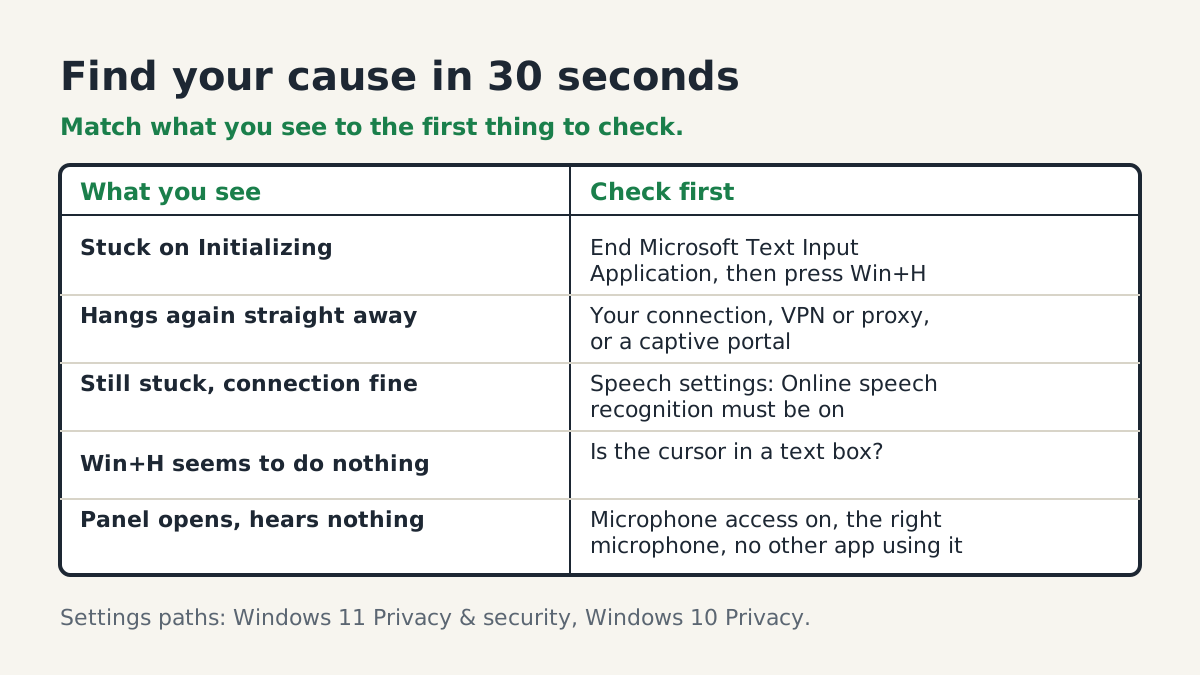
Find your cause in 30 secondsMatch what you see to the first thing to check.
Where the rest is
Why Initializing is a network symptom, whether voice typing works offline, and what voice access does differently are in the full article.
Researched and drafted with AI, then reviewed and edited by the site's editors.