05/27/2024
Mixamo Walk Cycle in Blender: Loop It in Two Steps
A Mixamo animation imports into Blender and plays exactly once. For a walk cycle that is nearly useless — you want it to run as long as the shot does.
Two steps:
- Import the animation and select the armature.
- In the Dope Sheet, press Shift + E and choose Make Cyclic.
- In the Graph Editor, select the armature, open the Modifiers tab on the right, and set After Mode to Repeat with Offset.
That is the whole fix.
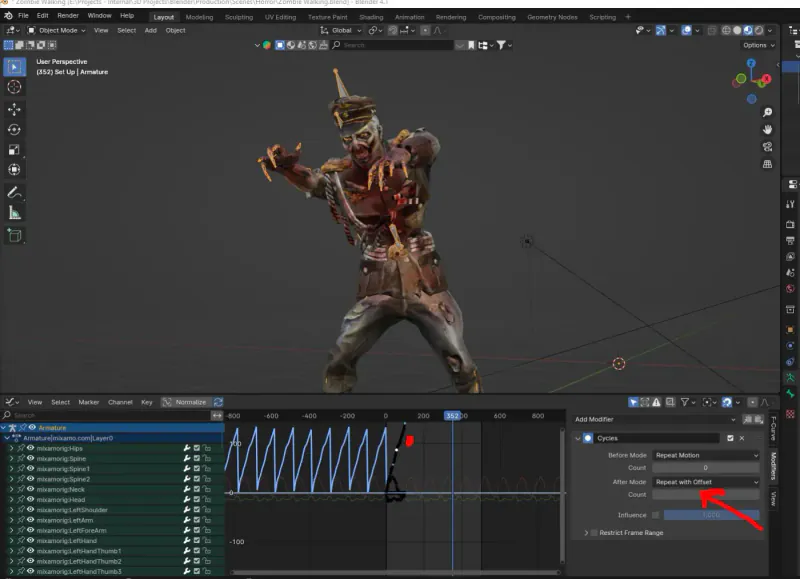
This is Balu Prime's method and his video explains it more clearly than any writing does. The notes here are for when you have watched it once and want the steps without scrubbing back through.
What those two steps actually do
Make Cyclic adds a Cycles F-modifier to the armature's curves. An F-modifier changes how a curve behaves outside its keyframed range, rather than adding keyframes — so the animation data is untouched and you can remove the modifier to get back exactly what Mixamo gave you.
Repeat with Offset is the part that matters for walking. Plain repeat restarts the curve at its original value each cycle, so a character walks one stride and snaps back to where they began. With offset, each repeat starts from where the last one ended, so forward motion accumulates and the character keeps walking.
That distinction is why a loop can look right in the graph and wrong in the viewport: the pose cycles correctly and the position resets.
The In Place trap
This works only if you exported from Mixamo without ticking "In Place". With In Place the root does not travel, so there is no forward motion for the offset to accumulate — you get a character walking on the spot forever, which is correct behavior and not what you asked for.
If you already exported In Place, you have two options: re-export without it, which is faster, or build the first cycle's travel yourself by keyframing the hip and letting the offset repeat that. Re-exporting is almost always the better use of the afternoon.
When you want In Place
Worth saying, because In Place is not a mistake — it is the right export when something else moves the character: a game engine's locomotion system, a follow-path constraint, or a parent empty you animate yourself. The rule of thumb is that whatever provides the forward motion should be the only thing providing it.
Questions this keeps raising
Why does my Mixamo walk cycle snap back at the end?
The Cycles modifier is repeating without offset, so each cycle starts from the curve's original values and the character returns to where they began. Set After Mode to Repeat with Offset in the Graph Editor's Modifiers tab and each repeat continues from where the last one ended.
Does this change the animation data?
No. An F-modifier affects how a curve is evaluated outside its keyframed range rather than writing keyframes, so removing it returns you to exactly the imported animation.
I exported with In Place and it walks on the spot.
That is In Place working as intended - the root does not travel, so there is no forward motion for the offset to accumulate. Re-export from Mixamo with In Place unticked, which is quicker than keyframing the hip travel yourself.
When should I use In Place then?
Whenever something other than the animation is moving the character: a game engine's locomotion, a follow-path constraint, or an empty you animate. The forward motion should come from exactly one place, and In Place is how you stop the animation being a second one.