08/17/2025
Find broken images on your site with a free plugin
Three ways, depending on what you run
On WordPress
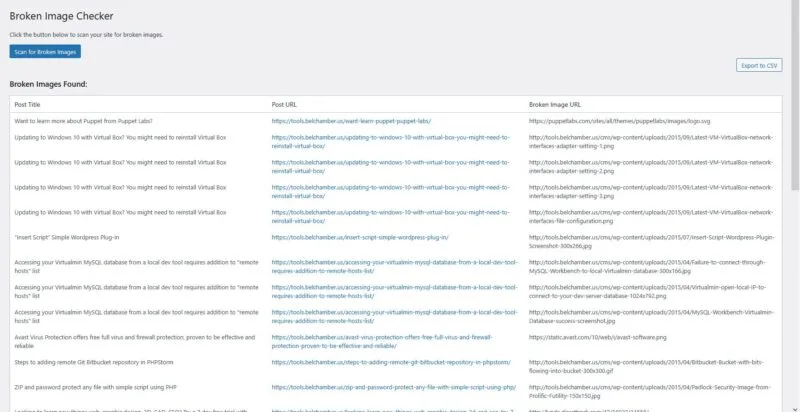
The Broken Image Checker plugin crawls your posts and pages and exports a CSV of every image returning a 404.
On anything
Paste a page's HTML or a list of URLs into the broken-image checker on this site. It runs in the browser and uploads nothing.
One page, right now
Open DevTools, reload with the Network tab on, and filter by status. Fastest when you already suspect a particular page.
Broken images are the quietest thing a migration breaks. The page still loads, the layout still works, and the picture is simply not there — so unless somebody opens that exact post, nobody finds out.
On WordPress
Install Broken Image Checker from Add New Plugin, or from wordpress.org. It walks your posts and pages, requests each image, and lists the ones that fail. The results export as a CSV, which is what makes it useful on a site with years of archive: you get a work list rather than a screen to scroll.
On anything else
Most people searching this are not on WordPress, and a plugin is no help to them. The broken image checker on this site takes a page's HTML or a list of image URLs, requests every one, and reports what came back. It runs entirely in your browser — nothing is uploaded anywhere — and it does not care what built the page.
For one page you already suspect
Open developer tools, switch to the Network tab, and reload. Sort or filter by status and the 404s group together. This is the fastest route when you have a specific page in mind and the slowest when you do not, because it only ever sees the page you are looking at.
What actually causes them
Worth knowing, because the cause tells you whether one fix will clear a hundred of them:
- A migration changed the upload path. Every image moves at once, so a single search and replace in the database fixes the lot. This is the common one and the one worth checking first.
- A hotlinked image on somebody else's site went away. Nothing to fix on your end but the reference; you need a copy of your own.
- A CDN or subdomain was retired, so
img.example.comstops resolving while the HTML still points at it. - A file was renamed for tidiness and the reference was not.
Does it matter for search?
Less than people fear, and more than nothing. A missing image is not a ranking penalty in itself. What it costs you is the image search traffic that image was earning, and — if the alt text was doing work — some of the context the page gave a crawler about its own subject.
The practical answer is that fixing a hundred broken images from one bad migration path is worth an afternoon, and hunting individually for images that a 2013 post lost is usually not.
Questions this keeps raising
How do I find broken images if I am not on WordPress?
Use a checker that works on the rendered page rather than the CMS - the one on this site takes a page's HTML or a list of image URLs and requests each one in your browser. For a single page you already suspect, the Network tab in developer tools filtered by status is faster than any tool.
Do broken images hurt SEO?
Not as a direct ranking penalty. They cost you whatever image search traffic those files were earning, and some of the context alt text gave a crawler about the page. Worth fixing in bulk after a migration; rarely worth hunting one at a time on old posts.
Why did a migration break them all at once?
Because the upload path changed and every reference in the content still points at the old one. That is good news - one search and replace across the database usually fixes every instance, which is why it is worth identifying the pattern before fixing anything by hand.
The image loads for me but the checker says it is broken.
Usually a cached copy in your own browser, or a hotlinked image whose host blocks automated requests but serves a real browser. A site refusing an automated request has not proved the image is gone, which is why a checker should report "could not verify" rather than "broken".